





Hi there! How can we help you today?
Hosting vs VPS: Which Should Your Business Choose?
-
Home
-
Hosting & VPS
-
Hosting vs VPS: Which Is Right for Your Business Website?
Hosting vs VPS: Which Is Right for Your Business Website?
An in-depth comparison of shared hosting and VPS on performance, security, scalability and cost, to help you choose the right infrastructure in 2026.
Contents
When building a new website or upgrading an existing one, the most common headache for business owners and individuals is: "Should I buy shared hosting or rent a VPS?". Choosing the wrong platform not only wastes money but can also make your website slow, cost you customers and hurt your Google rankings.
In this in-depth guide, TeamDevDesign breaks down the fundamental differences, compares the pros and cons, and offers practical advice to help you choose the solution that best fits your business model.
1. The core difference: an easy-to-understand analogy
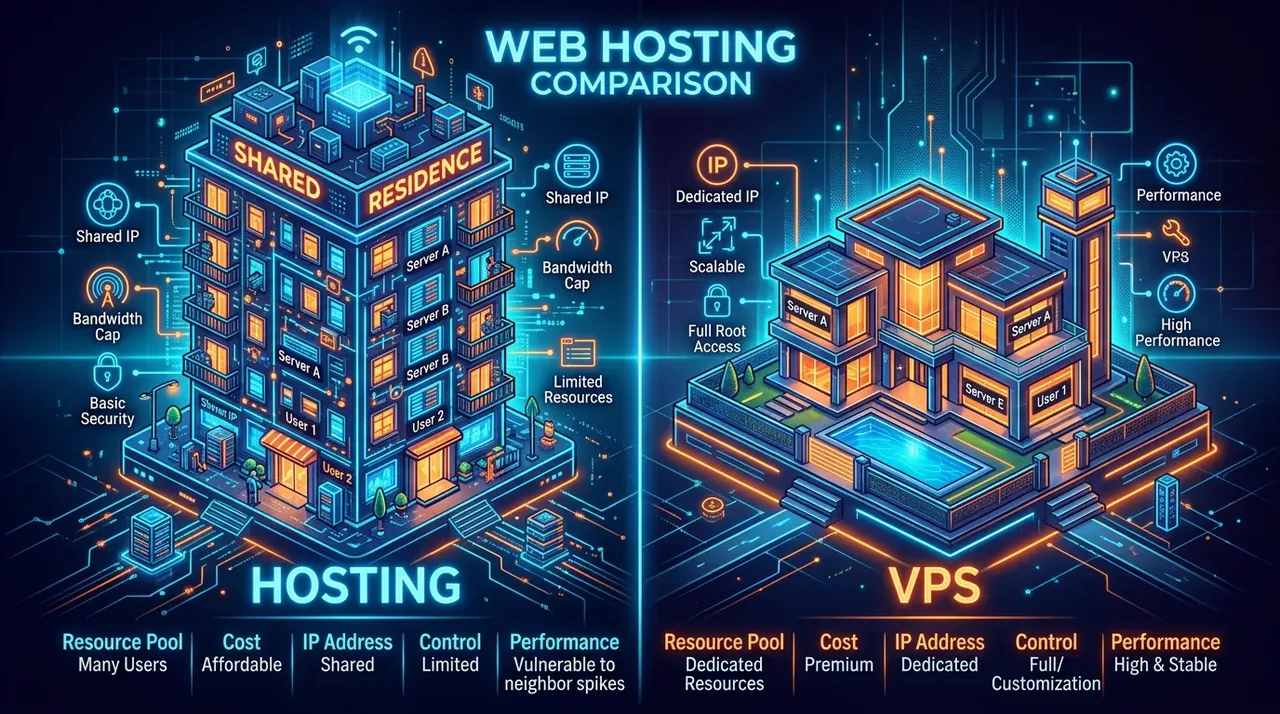
To picture server technology more easily, imagine the Internet is a city and your website is a shop.

What is shared hosting (web hosting)?
Shared hosting is like renting a bed in a student dormitory. You share all the space, bathrooms and kitchen (CPU, RAM and bandwidth) with hundreds of other people in the same building (the physical server). If a roommate uses too much water (their website is overloaded or under DDoS attack), your water runs short too (your website slows down or goes down with it).
What is a VPS (Virtual Private Server)?
A VPS is like renting a self-contained apartment in a building. You still live in the same building (the physical server), but you have your own key, your own utility meters and an independent living space. No one can disturb you or overuse your resources. What's more, you are free to remodel and paint it however you like (full control to install the operating system and software).
2. Detailed hosting vs VPS comparison table for 2026
Below is a comparison of the 5 most important criteria that determine the success of a web project:
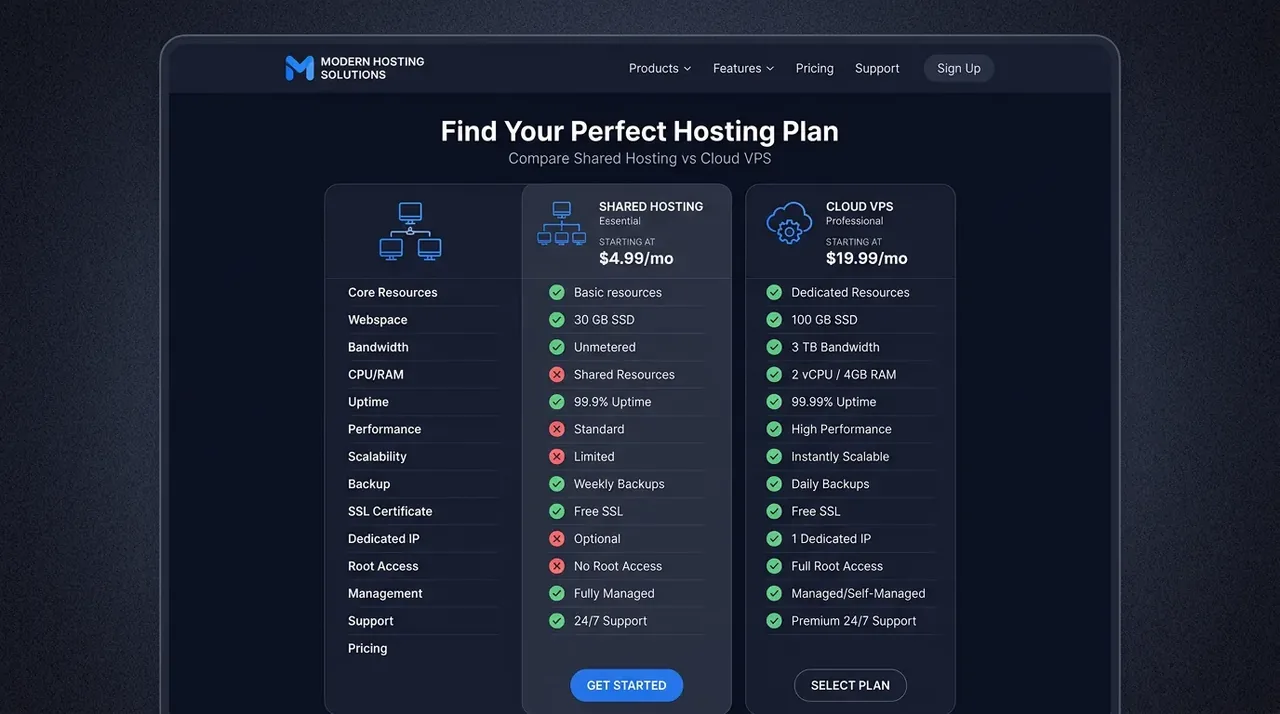
| Criteria | Shared Hosting | VPS (Virtual Private Server) |
|---|---|---|
| 1. Performance & speed | Average. Speed depends on your "neighbors" on the same server. | Excellent. Resources (RAM, CPU) are allocated to you, not shared with anyone. |
| 2. Security | Lower. Malware can spread between accounts if the server is poorly configured. | Higher. A fully isolated virtualized environment, and very secure when configured properly. |
| 3. System administration access | Limited (only the provided cPanel/DirectAdmin, no root access). | Full (full root access). Install any operating system, Nginx, Redis or Memcached. |
| 4. Scalability | Difficult. You must upgrade to a higher plan or move servers. | Very flexible. Add CPU/RAM with a few clicks and a short restart (often around 5 minutes). |
| 5. Cost & required skills | Cheap ($2 - $5/month) and very easy to use (suitable for non-technical users). | Higher ($5 - $20/month) and requires IT skills to install, secure and configure. |
3. In-depth analysis: when should you choose each option?
Who should use shared hosting?
Despite its performance drawbacks compared with a VPS, shared hosting remains one of the most popular choices worldwide because it is convenient and "plug and play". Choose hosting if:
- You are an individual blogger, run a static portfolio site, or have a newly founded small business.
- Your website gets fewer than 500 visits per day.
- You have no experience with server administration (Linux, SSH commands).
- You want to keep costs to a minimum and let the provider's technicians handle issues for you.
Who needs to upgrade to a VPS?
If your website is your business's livelihood and its main revenue channel, relying on shared hosting is a significant risk. You should move to a VPS when:

- E-commerce websites: WooCommerce is very resource-intensive. The checkout process cannot be cached, so it needs the real CPU power of a VPS.
- Customer data security: You can't risk keeping sensitive data on a server shared with strangers.
- Traffic spikes: When you run ad campaigns (Facebook Ads, Google Ads), a sudden flood of visitors can bring down shared hosting and waste your ad budget.
- Advanced SEO optimization: You need page load times under 1 second (Core Web Vitals) by installing optimization technologies yourself, such as Nginx FastCGI, Redis and Elasticsearch.
A practical solution: Want the power of a VPS but don't know how to code or use Linux commands? The answer is a managed VPS. TeamDevDesign offers an all-in-one server and website management service. You get your own dedicated, powerful VPS, while TeamDevDesign handles the control panel setup (aaPanel), security configuration and regular data backups for you.
Frequently asked questions (FAQ)
Absolutely. You can start with shared hosting to save money. As your website grows, migrating all your data to a VPS is a very common and straightforward process.
With an unmanaged VPS, you only rent the bare server, install everything yourself and are responsible when something breaks. With a managed VPS (such as TeamDevDesign's service), the provider installs, maintains, configures security and backs up your data for you on a regular schedule.
Generally, yes. A cloud VPS runs on a cluster of servers with distributed storage, which reduces downtime. If one physical server fails, your VPS can be automatically moved to another server and keep running.
4. Series wrap-up
Comparing hosting and VPS is like comparing an e-bike with a big motorcycle. Neither is best for everyone; what matters is which one fits best with your current needs and capabilities.
If you decide to take the professional route (VPS), TeamDevDesign has prepared a complete roadmap to help you master it. Read our detailed guides:
- How to install aaPanel on an Ubuntu VPS as a cPanel alternative
- How to install WordPress on an aaPanel VPS in 5 minutes
- A 16-step checklist to secure your Linux VPS
- How to optimize your VPS so your website loads in under 1 second
- Build your own professional mail server on a custom domain
We hope this series makes server administration feel far less intimidating. Wishing your business continued success with a stable, secure website!
Share this post:
Contents
Related Posts

Hosting & VPS
How to Optimize Your VPS for a Fast WordPress Site
A practical guide to optimizing a VPS for WordPress: tune PHP-FPM, enable OPcache and Redis, and adj...

Hosting & VPS
Linux VPS Security: 16 Essential Steps for Beginners (2026)
A 16-step Linux VPS security checklist: SSH keys, a custom SSH port, disabling root, UFW, Fail2Ban,...

Hosting & VPS
How to Install WordPress on an aaPanel VPS: Point Your Domain and Set Up SSL
Step-by-step guide to installing WordPress on an aaPanel VPS: point your domain, create the site and...