





Hi there! How can we help you today?
Admin Dashboard UI Template for Websites & Apps
-
Home
-
Dashboard – Modern Admin Interface for Websites and Apps
Dashboard – Modern Admin Interface for Websites and Apps
Client
Vietnam
Start
Apr 02, 2026
Author
Lê Văn Thắng
Place
Ho Chi Minh City
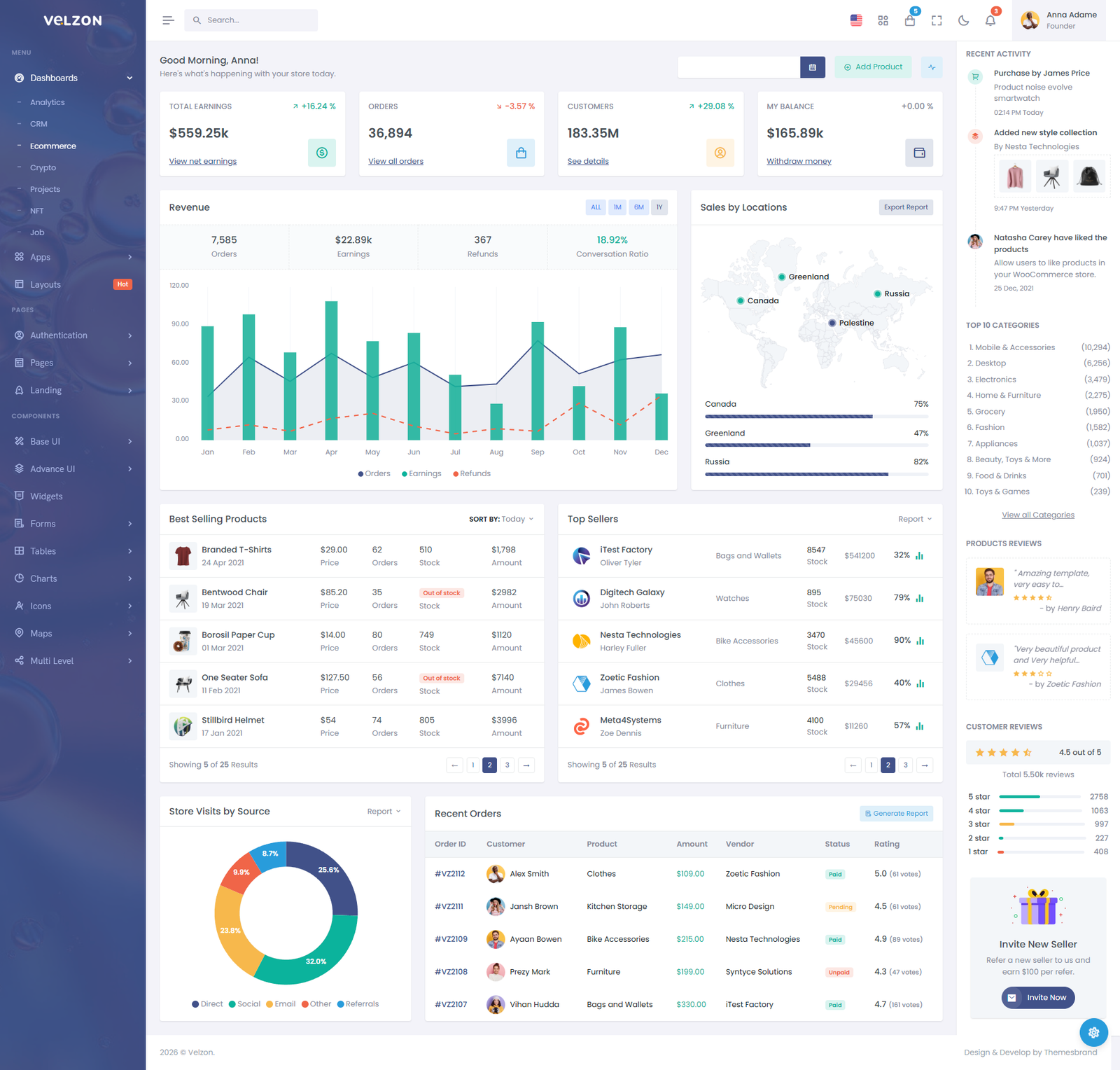
A modern admin dashboard UI for websites, software and apps: monitor data, manage operations and control the whole system from one clear, easy-to-use screen.
What Is a Dashboard?
A dashboard is the back-end admin area of a system, typically used by:
- Website administrators
- Operations staff
- Business owners
- Accountants
- Marketing
- Sales staff
- Warehouse or HR managers
Through the dashboard, users can:
- View revenue
- Manage orders
- Manage customers
- Track statistics
- View growth charts
- Manage products, services or content
Main Components of a Dashboard UI
1. Sidebar Menu
The sidebar is the menu on the left that gives quick access to the system's functions.
Typical menu items include:
- Dashboard
- Products
- Orders
- Customers
- News
- Reports
- Settings
- Account
A modern sidebar usually features:
- Icons
- Collapsible / expandable menu
- Multi-level menus
- Highlighting of the active item
2. Header / Topbar
The top bar of a dashboard usually includes:
- Logo
- Search box
- Notifications
- Messages
- User profile
- Light / dark mode toggle
The top bar lets users act quickly without switching between many pages.
3. Statistic Cards
This section gives a quick view of key metrics such as:
- Total revenue
- Number of orders
- Number of customers
- Traffic
- Conversion rate
Sample figures:
- 1,250 orders
- 85 new customers
- Revenue of VND 120,000,000
- 15% monthly growth
Statistic cards are usually designed with:
- Eye-catching colors
- Icons
- Large, easy-to-read numbers
- Up / down indicators
4. Charts and Reports
Charts help administrators easily see how the system is trending.
Common chart types:
- Bar charts
- Line charts
- Pie charts
- Monthly revenue charts
- Customers by region charts
For example, a sales dashboard can show:
- Daily revenue
- Best-selling products
- Customer sources
- Orders this week
5. Data Tables
Dashboards usually include data tables to display:
- Order lists
- Customer lists
- Products
- Staff
- Appointments
A modern admin table usually offers:
- Quick search
- Filters
- Column sorting
- Pagination
- Export to Excel / PDF
- Inline editing
Popular Types of Dashboard UI
Sales Dashboard
Suitable for:
- E-commerce websites
- Online shops
- Sales systems
Displays:
- Revenue
- Orders
- Inventory
- Customers
- Best-selling products
Education Dashboard
Suitable for:
- Training centers
- Online course websites
Displays:
- Number of students
- Number of courses
- Learning progress
- Course revenue
Clinic / Hospital Dashboard
Suitable for:
- Clinics
- Dental clinics
- Hospitals
Displays:
- Medical appointments
- Doctors on duty
- Patients
- Service revenue
Travel Dashboard
Suitable for:
- Tour websites
- Hotel booking
- Car rental
Displays:
- Tour bookings
- Revenue
- Customers
- Room bookings
Modern Dashboard UI Design Trends
Today's modern dashboards often follow these styles:
- Minimalist design
- Light color schemes or dark mode
- Cards with large rounded corners
- Clean, consistent icons
- Generous white space for readability
- Subtle motion effects
- Responsive on both desktop and mobile
Popular colors:
- Blue
- Purple
- White
- Light gray
- Modern gradients
What Can a Dashboard UI Be Built With?
A dashboard UI can be built with many different technologies, such as:
- HTML + CSS + JavaScript
- Bootstrap
- Tailwind CSS
- ReactJS
- VueJS
- Laravel Blade
- WordPress Admin Theme
- NextJS
For larger systems, dashboards are often custom-coded in Laravel or React to:
- Improve processing speed
- Make features easier to extend
- Strengthen security
- Connect real-time data
Benefits of a Well-Designed Dashboard
- Makes management easier
- Helps improve productivity
- Visual data tracking
- Reduces time spent on routine tasks
- Supports faster decision-making
- Gives your business a professional look
Share this project:
Note: some projects/templates were built and customised by TeamDevDesign on themes, plugins or source code licensed from third parties (e.g. Botble, ThemeForest, CodeCanyon). Names and trademarks belong to their respective owners. See Terms of Use.